How to Get Client Approval in Writing, Even After a Call
- Published
- November 21, 2026
- Reading
- 8 min read
- Share
In This Piece
- The Short Version
- What Does Client Approval Mean?
- How Do You Get Client Approval in Writing After a Call?
- What If the Yes Came by Email or Chat?
- What Should a Written Approval Record Hold?
- What If the Client Has More Than One Approver?
- What If the Client Changes Their Mind?
- How Do You Get Fewer Approvals Outside the Review?
- Where GoMimic Fits
- Questions People Ask
To get client approval in writing, ask for it on a review the client answers piece by piece, and when the yes comes some other way, confirm it the same day: one short message naming what was approved, which version, who said yes, and when. Then keep their reply where every other approval for that client lives, marked as a yes you recorded rather than one they clicked.
The Short Version
- Just got a yes on a call? Confirm it in writing today, with the template below.
- Got a yes buried in an email thread? Turn it into a clear record, post by post.
- Not sure what to write down? Keep five lines: what, which version, who, when, and how.
- Two people need to approve? Get the yes from each, not just the one on the call.
- Want every yes, clicked or recorded, in one place, marked Approved externally with who recorded it? That's what GoMimic does.

What Does Client Approval Mean?
Client approval is the client's yes to a specific piece of work, in a specific version, from someone allowed to give it. All three parts matter. "Looks good" on a call is a real reaction. It isn't yet an approval anyone can point to later.
That gap is where agencies lose time. In an IPA study published in March 2025, only 23% of agencies agreed the current approval process works well, and only 43% agreed the right people sign off on creative work (IPA, BetterIdeas Project, March 4, 2025). A yes nobody wrote down makes both worse: you can't show who approved, or that they were the right person.
Project managers have said the same for years. When they discussed whether verbal approval is enough on ProjectManagement.com in 2020, replies kept recommending a written confirmation, even a simple email (ProjectManagement.com).
Whether a spoken yes binds anyone is a question for your contract, not this post. Check whether your agreement asks for approval in writing. For content, the practical answer is the same either way: get it written down.
How Do You Get Client Approval in Writing After a Call?
Send one short message, the same day, while everyone remembers the call. It should name the pieces and the version, and ask for one reply.

Here's a template you can copy:
Thanks for the call today. So we have it right: you approved the March newsletter and the two LinkedIn posts, as we sent them on Tuesday, with no changes. A quick yes to this email and we'll get them ready. If anything's off, tell us here and we'll fix it before anything goes out.
Why it works:
- It names the pieces. "The March newsletter and the two LinkedIn posts," not "the content."
- It names the version. "As we sent them on Tuesday." If you changed a line on the call, say which.
- It asks for a reply, not a meeting. One word back is enough.
- It goes to the person who said yes. Copy anyone else who needs to know, but the yes comes from the approver.
This is a confirmation, not a request. For the email that asks a client to review in the first place, with subject lines that work, see how to ask a client to review.
What If the Yes Came by Email or Chat?
Then you already have it in writing, just not in a useful shape. "Looks good, thanks!" under a thread of three posts covers none of them for certain.
Read it the way a stranger would, because a stranger may have to one day. Does it name the piece? Is it about the current words, or a version before your last edit? Did it come from someone who can approve? If any answer is shaky, reply with the same confirmation as above and record their answer instead.
Our Learn page on confirming a client approval given by WhatsApp or phone walks through that check in more detail.
What Should a Written Approval Record Hold?
Five lines, kept with every other approval for that client, not in call notes or someone's inbox.
- What was approved: each piece by name.
- Which version: the date you sent it, or a version number.
- Who said yes: their name and role.
- When: the date and time they said it.
- How: on a call, by email, or in a chat, with their message kept.
And one more, which most templates leave out: who recorded it. A yes you typed in for the client is still their yes, but the record should say a person on your team wrote it down. That keeps it honest if anyone asks later.
At GoMimic we think every yes needs a note of which version the client okayed and when. Without those two lines, a written approval can't settle anything.
What If the Client Has More Than One Approver?
Then a yes on the call from one of them isn't the whole answer. If the client's CEO and their marketing lead both sign off, confirm with each, or with the one your kickoff agreed has the final word.
Write down which approver said what. When two people disagree, the record shows it, and the decision stays with the client, not with you. We cover setting that up in when a client needs a second approver.
What If the Client Changes Their Mind?
They're allowed to. The record isn't there to win an argument. It's there so the conversation starts from facts.
If a client says "I never approved that," open the record and the confirmation together. Usually the answer is simpler than a dispute: they approved Tuesday's version, and a line changed after. That's why one rule matters more than the rest: any change after a yes needs a new yes. A small tweak to approved text is a new version nobody has approved.
How Do You Get Fewer Approvals Outside the Review?
Make the written yes easier than the spoken one. Clients say yes on calls because it's the easiest moment to say it, so give them a written way that's just as easy: one link, no login, an answer on each piece, and a regular day each week. Some yeses will still come on calls. That's fine, as long as they end up in the same record as the clicked ones.
Our content approval guide covers the whole process, from the request to the record, for every client.
Which Version, and When
A yes is only useful later if someone noted which version the client okayed, and when.
Where GoMimic Fits
Create client content in each client's voice. Get it approved. Deliver it. GoMimic is the Connected Content System for Client Work, built for content worth putting your client's name on. We make it, so weigh what we say about it accordingly. Each client's voice gets better with every piece you create and every approval, so there's less to fix each time.
GoMimic makes the written yes the easy one, and keeps the other kind honestly:
- The client reviews on one link, with no login, and answers post by post. Every decision is recorded with who and when.
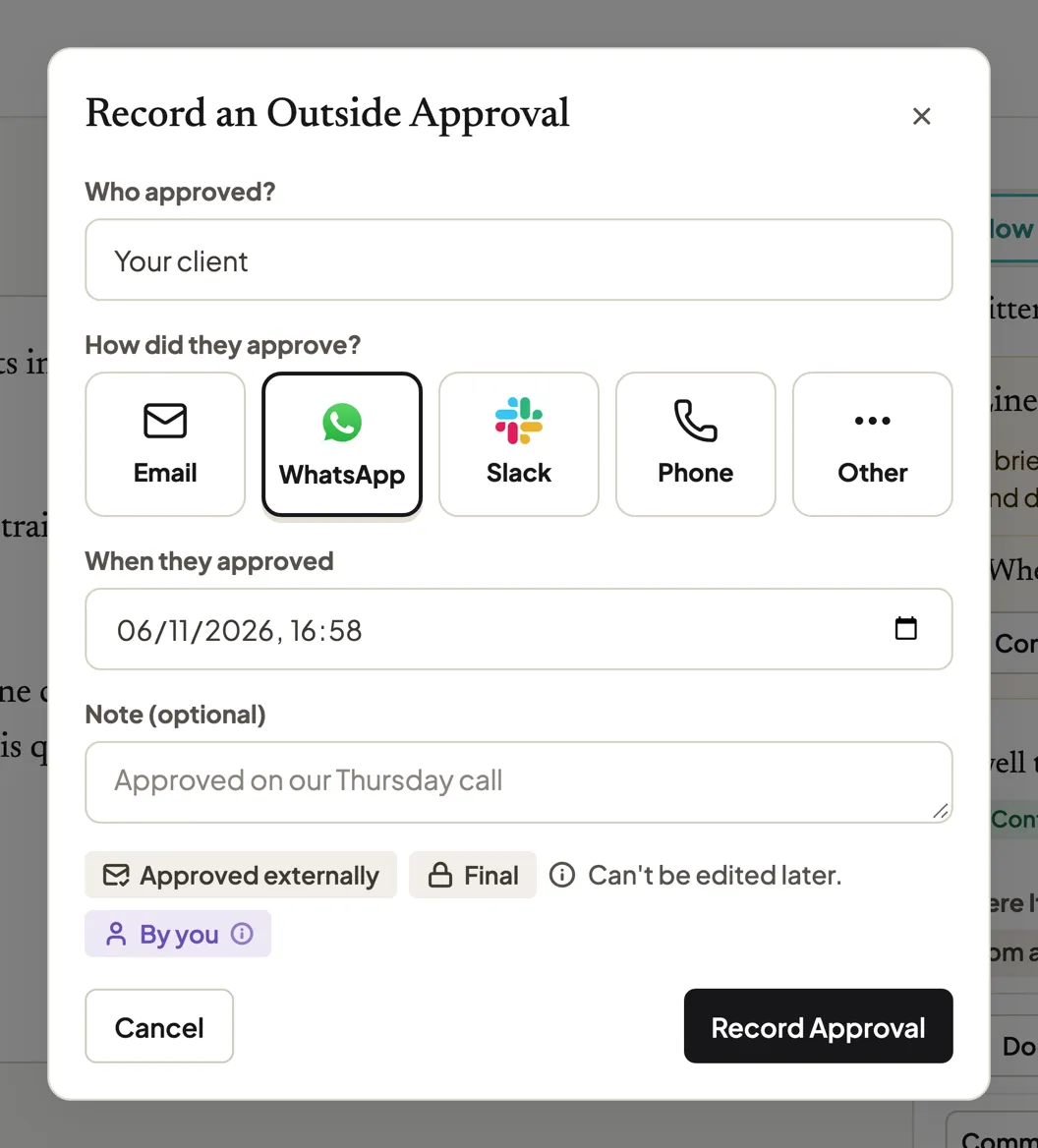
- A yes from a call, email, or chat goes in the same record. Record an Outside Approval asks who approved, how (email, WhatsApp, Slack, phone, or other), and when, with an optional note.
- It's marked Approved externally, with who recorded it. It never reads as the client's own click. The record names the person on your team who wrote it down, and it can't be edited later.
- The approved text locks. To change it, Edit Anyway sends it back round for a new yes.
- One record for every yes. The approval record exports as a PDF or CSV.

Where it falls short: it can't hear your calls. Someone on your team still has to record the yes, and the confirmation email is still worth sending. It never posts, by design: the approved version goes to the scheduler you already use, unchanged.
Questions People Ask
How do you get client approval in writing?+
Ask for it on a review the client answers piece by piece. When the yes comes on a call or in a chat, send a same-day confirmation naming the pieces, the version, who approved, and when, and keep their reply in that client's approval record.
What does client approval mean?+
The client's yes to a specific piece of work, in a specific version, from someone allowed to give it. Without all three, a "looks good" is a reaction, not an approval anyone can point to later.
Is a verbal approval enough for client content?+
Not on its own. Confirm it in writing the same day and keep the client's reply. Whether a spoken yes is binding depends on your contract, so check whether it asks for approval in writing.
How do you confirm a client's approval by email?+
Thank them, name each piece and the version they approved, and ask for a one-word yes. Send it the same day, to the person who approved, and file their reply with that client's other approvals.
What should a client approval record include?+
What was approved, which version, who said yes, when, and how, plus who on your team recorded it if the client didn't click approve themselves.
What if a client denies approving something?+
Open the record and the confirmation together, calmly. Most disputes turn out to be about a later version. If the text changed after their yes, ask for a new yes.
Written by the GoMimic team
GoMimic helps you create client content, get it approved, and deliver it, in each client’s voice.
Why It WorksMore from GoMimic
Social Media Approval Tools and Client Approval Software: A Buyer's Guide
How to choose a social media approval tool or client approval software: four kinds of tool, a scorecard for posts and long form, and a test to run first.
Content Approval Workflow: Stop Chasing Client Sign-Off
A content approval workflow for client work: why sign-off stalls, what to send, messages to copy, and what a no-reply clause in a contract can and can't do.